
What the Knowledge Base Includes
The Knowledge Base is continuously updated and personalized for your community. Inside, you’ll find:
Before Closing
-
An overview of the construction process
-
Key milestones and what to expect
-
Community information and FAQs
-
Guidance on selections, walkthroughs, and closing preparation
After Closing
Once you close on your home, additional sections unlock, including:
-
Home maintenance and care guides
-
Warranty information and service policies
-
Seasonal checklists and long-term upkeep recommendations
-
Community guidelines and resources specific to your home
This phased approach ensures that you receive the right information at the right time—without being overwhelmed.
How Access and Permissions Work
Access to the Knowledge Base is managed by our sales team.
Before Closing
After signing your Purchase & Sale Agreement, you will receive access to a curated set of articles that help you understand the building process and prepare for your upcoming move.
After Closing
Your access expands to include:
-
The full library of home care and maintenance articles
-
Warranty details and service resources
-
Community guidelines and long-term care information
Access to the Customer Service Portal is not granted until after your closing.
If something appears locked before your closing date, that is expected—those areas will unlock automatically once your sale is finalized and your account is updated.
How to Access the Knowledge Base
Follow these steps to create your login and access the Knowledge Base:
Step 1: Look for Your Registration Email
Shortly after signing your Purchase & Sale Agreement, you will receive an email inviting you to register.
This email allows you to create your login and set your password.
If you don’t see it, check your spam or promotions folder.
Step 2: Register Your Account
If you didn’t receive the email, you can also register manually:
-
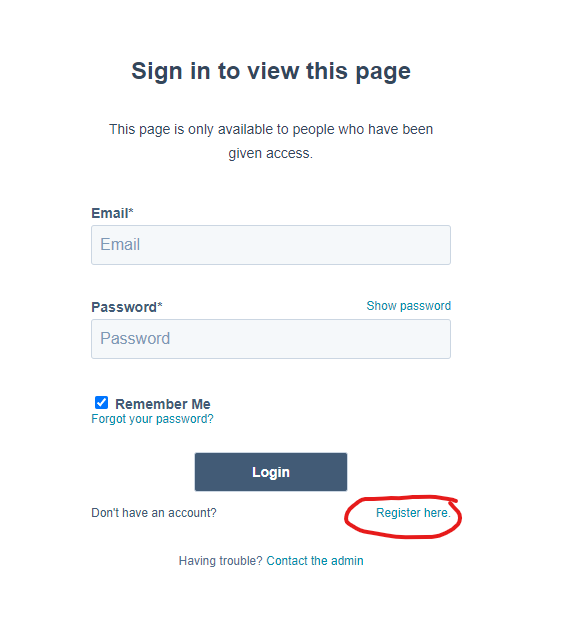
Go to the login page.
-
Click Register Here (located under the Login button).
-
Enter the same email address we have on file for you.
-
If you use a different email, your access may not match correctly, and we may need to adjust your account.
-
Create your password when prompted.
Step 3: Sign In
Once registered:
-
Return to the login screen.
-
Enter your email and password.
-
Click Login to access your Knowledge Base.
If You See an Access Error
You may occasionally see a message that you do not have access to a specific page. This can happen if:
-
You registered with a different email than the one on file
-
Your permissions haven’t yet been updated by the sales team
-
You are attempting to open an article that is only available after closing
If you encounter an access issue, simply reach out to us and we will adjust your permissions.
Your Homeowner Resource Hub
The Knowledge Base is here to support you throughout the entire process—from watching your home take shape to caring for it long after move-in.
We encourage you to explore this resource early and return to it often.